
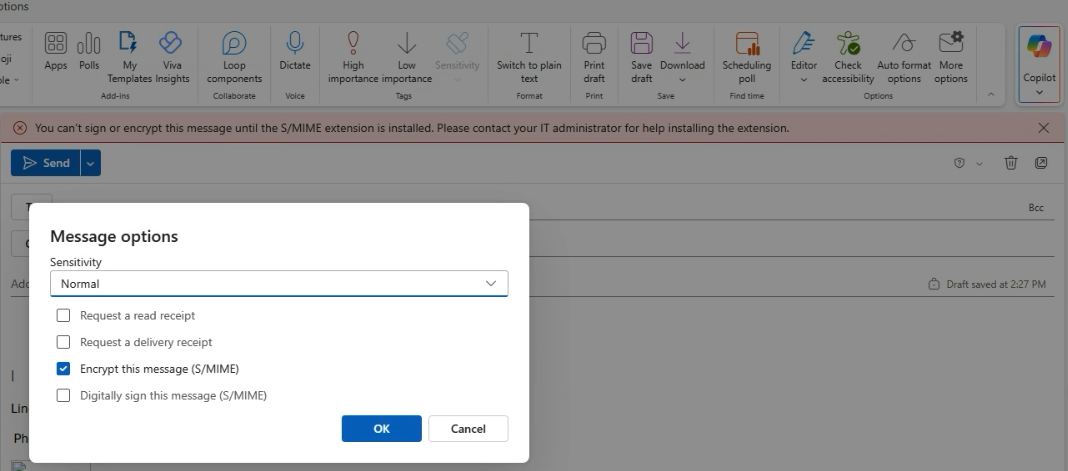
This came up in troubleshooting how S/MIME plays into email encryption for Business users. Valuable to understand the behind the scenes of how email encryption works so we can help our customers understand when they go to click the wrong way of encrypting their emails as a Premium user 🙂
https://learn.microsoft.com/en-us/purview/email-encryption
Short and sweet – there are two ways to encrypt emails in Outlook, and only one is the one we’d really want to recommend for maximum useability, but that users have the option to select if they don’t know better:
- Default recommendation, and the one we’re used to:
- New Message > Options > Encrypt > Encrypt
- This encrypts emails on the server level and lets servers authenticate senders and recipients to allow the recipients to actually read the email more readily.
- Not recommended because way more work on sender and recipient end to allow recipient to actually read the email
- New message > More Options > Encrypt with S/MIME and Digitally sign with S/MIME
- Encrypting with S/MIME, if not configured properly (and likely with Microsoft’s help) will error out like in the image above, and will also require the recipient to have configured S/MIME certs on their end in order to actually read the email.
If you run into this, that’s the gist of why we wouldn’t want to recommend option 2 🙂 way more hassle for not a lot of extra payoff unless an org is getting extra serious about their ability to verify the sender/recipient.