
Resolution found here: https://www.reddit.com/r/HyperV/comments/1he54pv/comment/m92ko75/?utm_source=share&utm_medium=web3x&utm_name=web3xcss&utm_term=1&utm_content=share_button&rdt=43004
If you run into this error when trying to Quick Create in Hyper V:
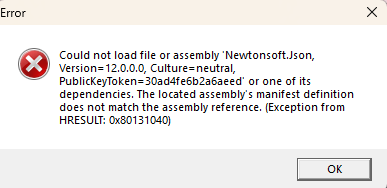
“Could not load file or assembly ‘Newtonsoft.Json, Version=12.0.0.0,
Culture=neutral, PublicKeyToken=30ad4fe6b2a6aeed’ or one of its
dependencies. The located assembly’s manifest definition does not
match the assembly reference. (Exception from HRESULT:
0x80131040)”
Then the workaround is an easy one.
============
u/overlockfr
It’s caused by a file that somehow got updated in the Hyper-V install.
Here’s how to fix it, until Hyper-V gets updated properly.
Create a file called VMCreate.exe.config with the content below, and then move it to C:\Program Files\Hyper-V
<assemblyBinding xmlns="urn:schemas-microsoft-com:asm.v1">

  <dependentAssembly>

    <assemblyIdentity name="Newtonsoft.Json" publicKeyToken="30ad4fe6b2a6aeed" culture="neutral" />

    <bindingRedirect oldVersion="0.0.0.0-12.0.0.0" newVersion="13.0.0.0" />

  </dependentAssembly>

</assemblyBinding>
That’s it; with this the VM creation tool will be able to start again
I’ve now included that config file to this article- just download it and put it in the folder listed.