Category: Printing and Scanning

Symbolic Link

For a symbolic link for Scan to SMB setup. Needs Administrator privilege in Command

Replace File paths within quotes to help reduce SMB jumps. First file path is directory you want Windows

to lie about where the SCANS folder actually is.

mklink /D “C:\Users\Ultrex IT\OneDrive – Ultrex\IT\SCANS” “C:\SCANS”

Command line Add Users and Scans Folder w sharing, Password Never Expires

Add User and Set Password to Never Expire (especially for Scanning User)

Net user Scanning Scanning12 /add


Make PW never expire

  • Command Line Admin: WMIC USERACCOUNT where Name=’Scanning’ set PasswordExpires=False
  • Powershell Admin: Set-LocalUser -Name “Scanning” -PasswordNeverExpires $true

Commands to Setup and Share Scans Folder through CLI

Mkdir C:\SCANS (creates Scans folder)

Dir C:\ (to confirm Scans folder creation)

Cd c:\scans (to select scans folder)

Net share scans=c:\scans /grant:Scanning,full (to grant read/write permissions with Scanning User – confirm permissions if needed)

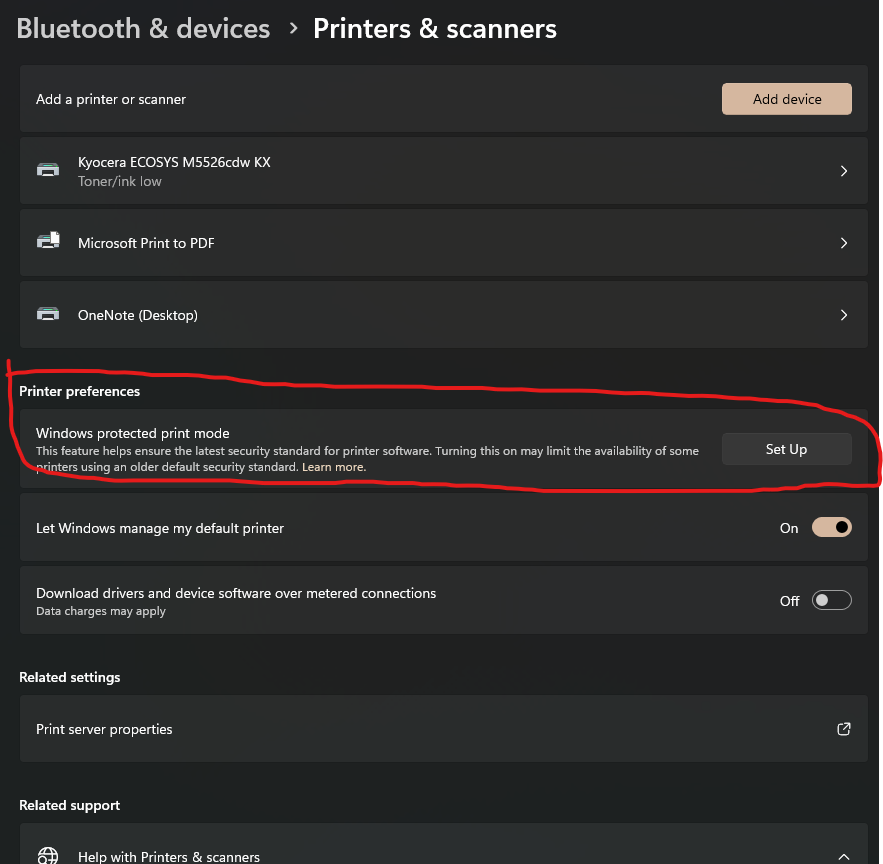
Windows Protected Print Mode: Disable to Fix Print Drivers not Installing by TCP/IP

Microsoft has made an update in Windows 11 in an update. Windows 11 version 24H2.

Windows Protected Print Mode (WPP) is a driver‑free, security‑focused printing mode in Windows that relies solely on the modern IPP (Internet Printing Protocol) stack and Mopria‑certified printers—eliminating third‑party drivers.

This eliminates the ability to use print drivers that don’t use IPP and makes TCP/IP unavailable completely. 

Microsoft as started to enable this by default on some newer PC’s.

If you have any print drivers that fail to install check here

Settings>Bluetooth and Devices>Printers and Scanners. Make sure it’s off.

Admin Username and Password for Copiers

Machine Password List

Kyocera Passwords:

Newer models:

User Name: Admin

Password: Admin
-OR-

First two numbers of the model number followed by two zeros:

Example: CS-5551ci would be:

User Name: 5500

Password: 5500

EPSON Passwords:

For WF-C879R:

Username: Admin

Password: Admin
Other Epson’s models – Customer Create their Own Password

Toshiba Passwords:

User Name: Admin

Password: 123456

The network password is also 123456.

NOTE: These OKI Machines have the same passwords as Toshiba: MPS4242, MPS 3537, MPS5502, ES9465 & ES9474

OKI Passwords:

User Name: admin

Copier interface Password: aaaaaa (the letter ‘a’ six times) -OR-

Password: 123456

Web interface Password: 000000 (6 zeros)

NOTE: These OKI Machines have the same passwords as the Toshiba: MPS4242, MPS 3537, MPS5502, ES9465 & ES9474

Older Models: 2530, 3530, 4030, 3035, 4035, 5035, 2525C, 3225C, 4035C admin password 6482 (We don’t change)

Older Model: 3050, 4050, 5050 admin login and password are both 5050

Older Models: 250, 300, 400, 500 admin password is the model and add a zero. (Password for 250ci is 2500)

Older Models: 550, 650 admin password is 123456

None of the copiers have admin passwords for the command center (web interface) except the 250, 300, 400, 500 the admin password is admin00.

CS-420i the admin password is admin00.

© 2026 Ultrex Staff

Theme by Anders NorenUp ↑